Smart Work Zone Equipment: What Hire Fleets and Contractors Need for DOT Projects
State DOTs no longer ask only for signs and cones. They now specify smart work zone equipment that reports location, status and messages in real time. Hire companies and traffic control contractors must supply that equipment or lose the bid. This guide explains what each device does, what DOTs ask for and how to prepare a fleet. It also shows where Optraffic variable message signs, arrow boards and light towers fit.
Smart work zones now appear on highway rebuilds, bridge works and utility projects. These construction jobs bring tight schedules, night shifts and crews close to live traffic.
Data links are where many fleets get stuck. Optraffic has already connected its message boards to a third-party traffic platform. The IKEA Auckland integration case shows how that project ran.
Key Takeaways
In-house R&D integration: Connected 35 message boards to a third-party traffic platform in two to three weeks.
One fleet platform: Controls message boards, arrow boards, light towers and camera towers from one login.
Factory-direct supply: Ships from the China factory without trading-company markups, keeping fleet costs predictable.
Field-proven LED modules: Keep message boards readable through long hire periods with low maintenance.
Specification-led builds: Adjusts display size, pixel pitch or colour to match a project specification.
North American supply: Reaches US and Canadian fleets through local distributors in Washington State and Western Canada.
Why DOTs Now Specify Smart Work Zone Equipment
Smart work zone equipment uses connected devices to warn drivers and inform operators. The US DOT ITS Joint Program Office lists these main uses:
Queue detection: Warns drivers of stopped traffic ahead.
Travel time information: Tells drivers how long a route will take.
Speed information: Shows drivers their speed or an overspeed warning.
Worker protection: Reduces unexpected vehicle entries into the work area.
Incident clearance: Helps operators clear crashes inside the zone faster.
For portable solar ITS devices beyond the work zone, see this guide to smart traffic solutions.
Smart Work Zone Contracts by State
States now write smart work zone equipment into contracts:
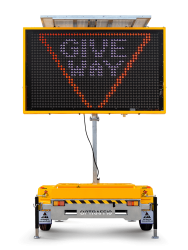
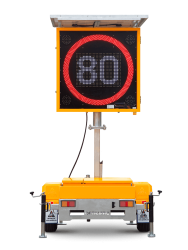
Overspeed warnings: Optraffic message board trailers take an optional radar module. Over the set speed, the board shows an overspeed warning instead of the speed.
Speed thresholds: Crews set thresholds through the Optraffic Web System.
Many fleets connect message boards but leave other devices offline:
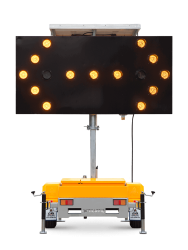
Arrow boards: Iowa’s rule shows DOTs now want lane closure status reported, not assumed.
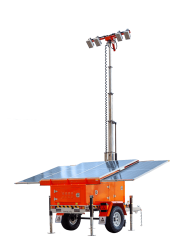
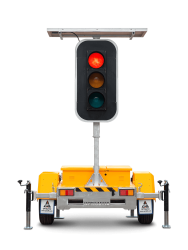
Light towers: A connected tower reports battery state before the crew leaves the yard. Optraffic solar light towers run over 35 hours per full charge, depending on configuration.
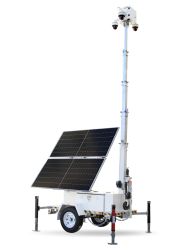
Message boards, arrow boards, light towers and camera towers on one platform
Build to specification
Contracts set display size, colour or format
Custom display size, pixel pitch and colour
LED reliability
A dark board breaks the message chain
Field-proven LED modules with low maintenance
Supply and price
Fleet growth depends on landed cost
Factory-direct supply from the China factory, no trading-company markup
Lead time
Contracts start on fixed dates
About six weeks’ production for trailer products, excluding sea freight
Factory-Direct Smart Work Zone Equipment Supply
In-house build: Optraffic designs and builds its range in its China factory.
No middle markup: Hire fleets pay no trading-company margin.
Faster parts: Spare parts ship from the production line.
Optraffic Smart Work Zone Equipment in North America
United States: Advanced Government Services (AGS), based in Tacoma, Washington, supplies Optraffic smart work zone equipment.
US range: Optraffic message boards, arrow boards, light towers and the Optraffic Web System.
Canada: ATS Traffic carries Optraffic smart work zone equipment in Western Canada.
Western Canada projects: Municipal road projects in Alberta and other western provinces run on Optraffic message boards.
Other regions: Fleets buy direct from the China factory or through regional distributors.
LED Reliability for Smart Work Zone Contracts
Long contracts: Smart work zones often run through a full construction season.
Field-proven modules: Optraffic message boards use LED modules with a proven field record.
Automatic brightness control: Lower output at night reduces LED stress and supports low-maintenance service.
Smart Work Zone Equipment Checklist Before a DOT Bid
Run this checklist before you price a smart work zone contract:
Specification: Read the device, software and data requirements.
Current fleet: List devices that already report remotely.
Gaps: Identify devices to add, such as connected arrow boards or light towers.
Data format: Confirm what the DOT expects, such as a WZDx Device Feed.
Integration proof: Ask each supplier for a completed case and its timeline.
Lead time: Check delivery against the contract start date.
Monitoring: Plan one monitoring setup for every device on site.
Outside the US:
UK: Crews work under Traffic Signs Manual Chapter 8.
Australia: Crews follow AS 1742.3 and AS 4852.2.
Conclusion
Smart work zone equipment has moved from pilot projects into standard DOT contracts. Colorado asks for device data feeds, and Iowa requires smart arrow boards.
Optraffic supports hire fleets in four ways:
Platform integration: The R&D team builds data links project by project.
One platform: Message boards, arrow boards, light towers and camera towers share one login.
North American support: Distributors in the US and Canada support local projects.
Preparing a fleet for a smart work zone contract? Contact the Optraffic team with the specification and your current device mix.
FAQ
What equipment is in a smart work zone system?
A smart work zone system usually combines message boards, arrow boards, sensors, camera towers, light towers and software. The smart work zone equipment list in each contract depends on the DOT and the project.
Who supplies smart work zone equipment on a DOT project?
The contractor usually supplies it. Colorado’s Section 630 makes the contractor provide devices, software and a data feed. Many contractors rent or buy the devices from hire fleets.
What is a smart work zone data feed?
It is real-time device data shared with the DOT in an agreed format. Many states use the FHWA WZDx specification. A smart work zone data feed usually reports device location and status.
Where can North American fleets source Optraffic smart work zone equipment?
Optraffic supplies smart work zone equipment to US and Canadian fleets. Local support comes through distributors such as AGS in Washington State. Contact the Optraffic team to start a project.
Can existing message boards join a smart work zone?
Connected boards can, if they report remotely and accept commands. Stand-alone boards need replacement or an upgrade. Check whether the supplier can integrate boards with the project platform.